⚡ HELP & TUTORIALS: Master 32-stream turbo acceleration, BDIX peering, and BitTorrent pieces management.
📖 Comprehensive User Manual

Help, Guides & Tutorials

From your very first download to high-concurrency 32-stream work-stealing, custom themes, and BitTorrent pieces swarm tuning — everything is documented right here.

VISUAL INTERFACE GUIDE

🖥️ PyDM Pro Interface Walkthrough

Engineered for power users with dark high-contrast cyber aesthetics, live socket stream visualization, smart category path remembering, and seamless browser extension capture.
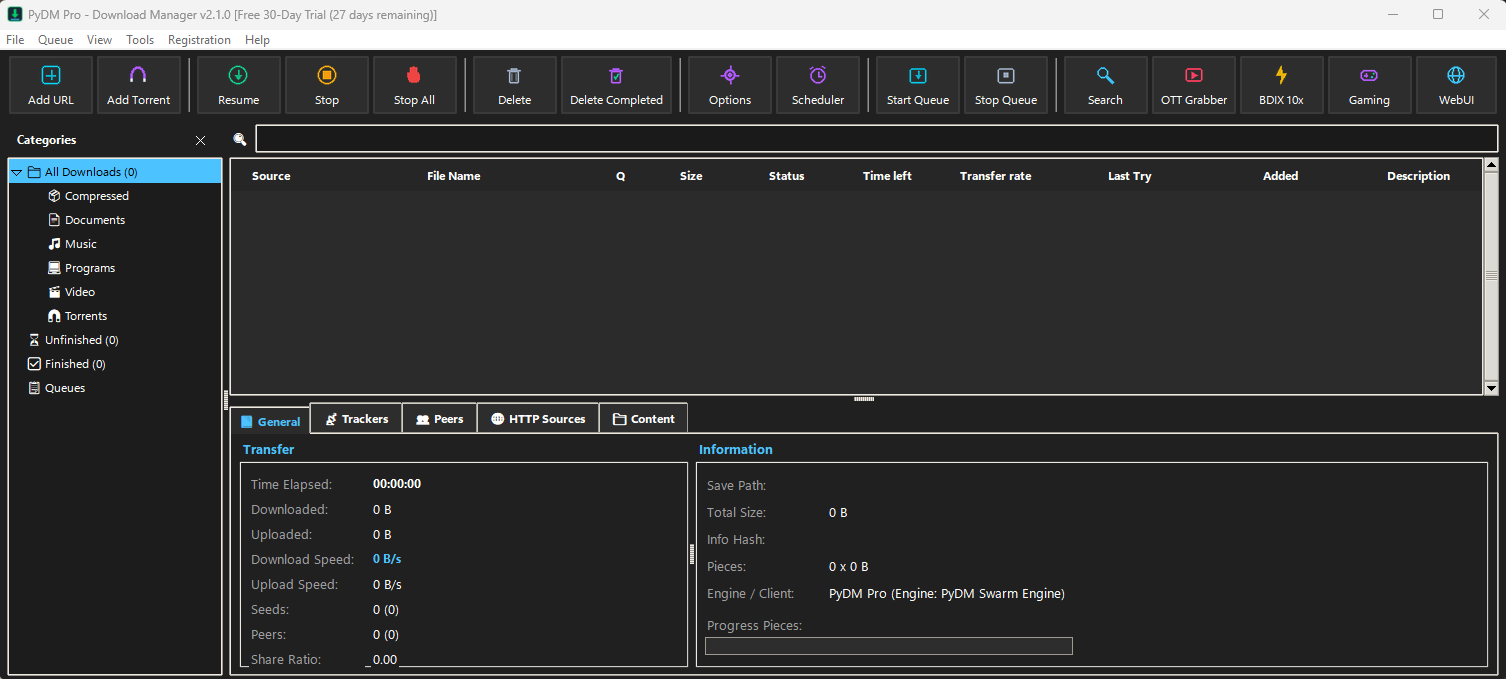
PyDM Pro Main Workspace Interface 🔍 Click to enlarge
1. Main Command Center & Workspace Window
MAIN WORKSPACE
PyDM Pro-এর মূল কমান্ড সেন্টার উইন্ডো: এটি সফটওয়্যারটির প্রাথমিক ওয়ার্কস্পেস। উপরে রয়েছে ১৬টি গুরুত্বপূর্ণ অ্যাকশন বাটন—নতুন ডাউনলোড যুক্ত করা (Add URL), টরেন্ট ফাইল খোলা (Add Torrent), রিজিউম (Resume), পজ/স্টপ (Stop), সব বন্ধ করা (Stop All), ফাইল ডিলিট, শিডিউলার (Scheduler), কিউ কন্ট্রোল, ওটিটি গ্র্যাবার (OTT Grabber), BDIX 10x টার্বো মোড, গেমিং মোড ও ওয়েবইউআই (WebUI)। বামপাশে ক্যাটাগরি তালিকা (Compressed, Documents, Music, Programs, Video, Torrents) দিয়ে ডাউনলোডকৃত ফাইল স্বয়ংক্রিয়ভাবে সাজানো থাকে। মাঝখানে ডাউনলোড হিস্ট্রি, ট্রান্সফার স্পিড ও প্রগ্রেস দেখা যায় এবং নিচের ডায়াগনস্টিক প্যানেলে Swarm সংযোগ, ট্র্যাকারস ও HTTP সোর্স লাইভ মনিটর করা যায়।
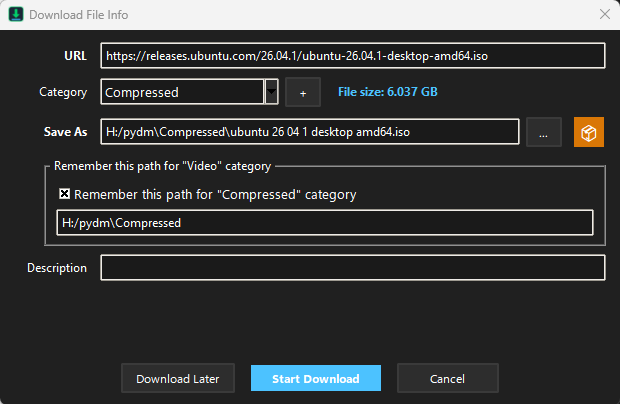
Download File Info Dialog 🔍 Click to enlarge
2. Download File Info & Smart Path Organizer
DOWNLOAD DIALOG
ডাউনলোড কনফার্মেশন ও ফাইল ইনফো ডায়ালগ: ইন্টারনেট থেকে কোনো ডাউনলোডে ক্লিক করলে বা ম্যানুয়াল লিঙ্ক দিলে এই পপ-আপ উইন্ডোটি খোলে। এটি স্বয়ংক্রিয়ভাবে রিমোট সার্ভার থেকে ফাইলের আসল সাইজ (যেমন: 6.037 GB ISO ফাইল) ডিটেক্ট করে এবং ফাইল টাইপ অনুযায়ী নির্দিষ্ট ক্যাটাগরি (যেমন: Compressed) নির্বাচন করে। ব্যবহারকারী চাইলে ফাইলের সেভ পাথ পরিবর্তন করতে পারেন এবং "Remember this path for category" চেকবক্স অন রাখলে ভবিষ্যতে সেই ক্যাটাগরির ফাইলগুলো স্বয়ংক্রিয়ভাবে একই ফোল্ডারে সেভ হবে। এখান থেকে সরাসরি "Start Download", পরবর্তীতে ডাউনলোডের জন্য "Download Later" (Queue) অথবা "Cancel" করা যায়।
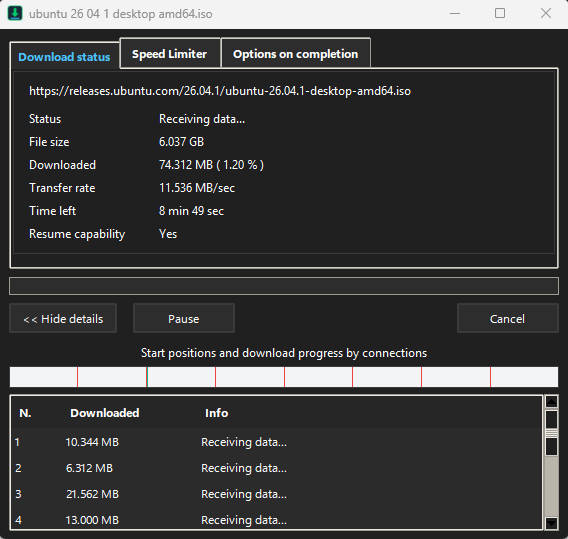
Active Download Monitor & Transfer Dialog 🔍 Click to enlarge
3. High-Speed Segmented Transfer Engine
TRANSFER ENGINE
মাল্টি-থ্রেড টার্বো ট্রান্সফার ও সেগমেন্টেড প্রগ্রেস উইন্ডো: সক্রিয় ডাউনলোডের সময় এই উইন্ডোতে রিয়েল-টাইম তথ্য প্রদর্শিত হয়। যেমন: লাইভ স্ট্যাটাস (Receiving data...), ফাইলের মোট সাইজ, কতটুকু ডাউনলোড হয়েছে ও শতাংশ (%), বর্তমান ট্রান্সফার স্পিড (যেমন: 11.536 MB/sec), অবশিষ্ট সময় (Time left) এবং সার্ভার রিজিউম সাপোর্ট (Resume capability: Yes)। নিচের বারে PyDM-এর সিগনেচার কানেকশন ভিজ্যুয়ালাইজার দেখা যায়, যেখানে প্রতিটি সমান্তরাল সকেট স্ট্রিম (1, 2, 3, 4...) কোনো ল্যাগ ছাড়া স্বাধীনভাবে ডাটা রিসিভ করে। এছাড়া এতে স্পিড লিমিটার (Speed Limiter) ও ডাউনলোড শেষ হলে পিসি শাটডাউনের অপশন রয়েছে।

Browser Floating Video Grabber Widget 🔍 Click to enlarge
4. One-Click Browser Video & Media Grabber
BROWSER EXTENSION
ব্রাউজার এক্সটেনশন ও ওয়ান-ক্লিক ভিডিও গ্র্যাবার: Chrome, Edge, Firefox, Brave ও Opera ব্রাউজারে PyDM Pro ব্রাউজার এক্সটেনশন সক্রিয় থাকলে যেকোনো ওয়েব পেজ বা স্ট্রিমিং সাইটে (যেমন: YouTube, Facebook, Vimeo, ভিডিও পোর্টাল) কোনো ভিডিও প্লে হওয়ামাত্রই প্লেয়ারের ঠিক উপরে এই ভাসমান "▶ Download this video" বাটনটি চলে আসে। কোনো ইউআরএল কপি-পেস্ট করার ঝামেলা ছাড়াই মাত্র ১ ক্লিকে সর্বোচ্চ রেজোলিউশনে সরাসরি ভিডিও ডাউনলোড করা যায়।
🚀

Start Here

First-time installation, platform bundles, and running your very first accelerated download.

Getting Started →
Install PyDM Pro (setup wizard, portable, or x64 zip on Windows; .deb, .rpm, .AppImage on Linux; .dmg on macOS), choose an interface language and tour the main window.
Your First Download →
A 2-minute walk-through: copy a download URL, watch PyDM Pro intercept it, inspect the 32 streams, and launch the finished file with zero stitching delay.
📥

Downloading

Adding URLs, batch sniffers, browser integration, remote server mode, and mobile control.

Adding Downloads→
Add URL dialog, clipboard automatic sniffer, drop target floating widget, batch URL queues, and Start Now vs Download Later scheduling.
Link Grabber & Archives→
Grab hundreds of web links simultaneously, group them into smart packages, and automatically unpack zip, 7z, and rar archives when done.
Browser Integration→
Native messaging extensions for Chrome, Edge, Brave, Opera, Vivaldi, Firefox, LibreWolf. Intercept clicks and provide seamless fallback.
Run PyDM Pro on a Server→
Deploy PyDM Pro headlessly on your home lab, NAS, or Unraid server via Docker with built-in REST API and remote WebUI.
Control PyDM Pro from Your Phone→
Send magnet links, video URLs, and queues to your desktop from your smartphone using the integrated WebUI or Telegram Remote Bot.
📂

Organising

Category trees, column customizers, queue management, and automated scheduler triggers.

The Download List→
Sortable columns, multi-criteria filters, smart category routing (Compressed, Documents, Music, Programs, Video, Torrents), and multi-file management.
Queues & The Scheduler→
Throttle concurrent transfers (e.g. 2 at a time), set clock-based schedules (midnight to 7 AM), and automatically put your PC to sleep on completion.
⚡

Speed & Connections

Hyper-stream architecture, dynamic work stealing, BDIX regional acceleration, and bandwidth limits.

Connections & Turbo Engine→
How PyDM Pro splits files over 32 concurrent HTTP/2 streams with active work-stealing, zero-copy sparse file writes, and the built-in Speed Limiter.
10x BDIX Peering Booster→
Automated ISP cache subnet discovery, mirror racing, and zero-latency routing across Bangladesh Internet Exchange peering fabrics.
🎬

Video & Torrents

4K/8K video capture, image galleries, BitTorrent swarms, SOCKS5 security, and Debrid accounts.

Video Downloads→
Download 4K, 8K, HDR, and 60fps videos from YouTube, Vimeo, Facebook, Bilibili, and 1000+ streaming sites using integrated yt-dlp.
Image Galleries→
Rip entire photo albums, manga chapters, and wallpaper sets from Wikimedia, Flickr, DeviantArt, and Reddit via gallery-dl.
Torrents & Magnets→
Full BitTorrent hybrid engine: load magnet links, inspect files in advance, sequential playback mode, DHT, PEX, and piece verification.
Torrents & Security→
Swarm privacy, IP blocklists, custom SOCKS5 proxy routing with multi-proxy failover, and strict private torrent flags.
Debrid Service Accounts→
Configure Real-Debrid, AllDebrid, Premiumize, and TorBox accounts to unrestrict premium file hosts at maximum speed.
⚙️

Settings & Customization

12-Tab options modal, 20 theme looks, 86 interface languages, USB portable mode, shortcuts, CLI, and AI MCP.

Options (12 Modular Tabs)→
Every setting explained: General, File types, Save to, Downloads, Connection, Remote, Proxy / Socks, Site Logins, Accounts, Sounds, Regional, Archives.
Themes (20 Built-in Looks)→
Midnight Cyan, Dracula Purple, Cyberpunk Neon, Nord Frost, Classic Windows, High Contrast, and how to craft custom themes in JSON.
Languages & RTL Support→
86 global interface languages, right-to-left layout engine, locale numbers and dates, and how to submit community translations.
Portable Mode→
Run PyDM Pro directly from any USB flash drive or external SSD without touching Windows registry or leaving traces.
Keyboard Shortcuts→
Full keyboard shortcuts reference for lightning-fast workflow, queue control, navigation, and screen reader accessibility.
Command Line & Automation→
IDM-compatible CLI arguments (/d, /n, /p, /a, /s), the pydm-cli standalone tool, and automation script interfaces.
AI Assistants (MCP Server)→
Connect PyDM Pro with Claude, Cursor, Antigravity, and VS Code via Model Context Protocol to automate queue curation and downloads.
💡

Step-by-Step Tutorials

Practical walkthroughs for common workflows: overnight queues, resuming broken files, and speed limits.

1. Download a File→
Copy a direct HTTP/HTTPS link, add it into PyDM Pro, view real-time segments, and open the destination folder.
2. Catch Downloads in Browser→
How to configure the extension so that clicking any download button in Chrome or Firefox transfers seamlessly to PyDM Pro.
3. Download Overnight→
Set a queue to start at 2:00 AM, maximize your off-peak bandwidth, and instruct PyDM Pro to shut down your PC when finished.
4. Resume Broken Downloads→
Fix interrupted transfers after network dropouts, expired security tokens, or temporary server 403 errors with Address Refresh.
5. Keep Speed for Gaming/Calls→
Engage the Speed Limiter to cap bandwidth so Zoom meetings, multiplayer games, and streaming remain 100% lag-free.
6. Download Video From a Webpage→
Use the floating download panel or copy the video page URL to choose resolution, audio bitrate, and subtitles.
7. Carry PyDM Pro on a USB Stick→
Configure PyDM-portable on a thumb drive so all configurations, categories, and downloaded files stay on the drive.
8. Find a Download in a Long List→
Use Ctrl+F, instant filename search, and category tree filters to pinpoint any file among thousands of completed items.
🚑

Help & Troubleshooting

Diagnostics, crash report analysis, extension permissions, and contacting developer support.

Crash Reports & Diagnostics→
Understand diagnostic logs, stack traces, and automatic crash dump recovery in %APPDATA%/PyDM/logs.
General Troubleshooting→
What to check when downloads fail, antivirus software blocks connections, or ports are inaccessible.
Browser Extension Troubleshooting→
Incognito permissions, conflict resolution with other download manager extensions, and native messaging host verification.
Release History & Changelogs→
Read full changelogs for every release: v2.1.0, v2.0.0, v1.9.5, v1.9.0, and download older archived releases.
Report a Problem / Support→
Submit a bug report, request a new feature, or ask for direct technical assistance from PyDM Pro core developers.

UI Showcase Full Preview